PRIOR AUTHPILOT

Prepare behavioral health prior authorization packets in minutes.

PriorAuth Pilot helps behavioral health agencies prepare, submit and track prior authorization requests: upload client documents, auto-fill the request form, draft the medical necessity summary with AI, and get reminders before authorizations expire. Built for Ohio Medicaid and its managed care plans.

Start free 3-day trialRequest a demoNo credit card required Watch how it works
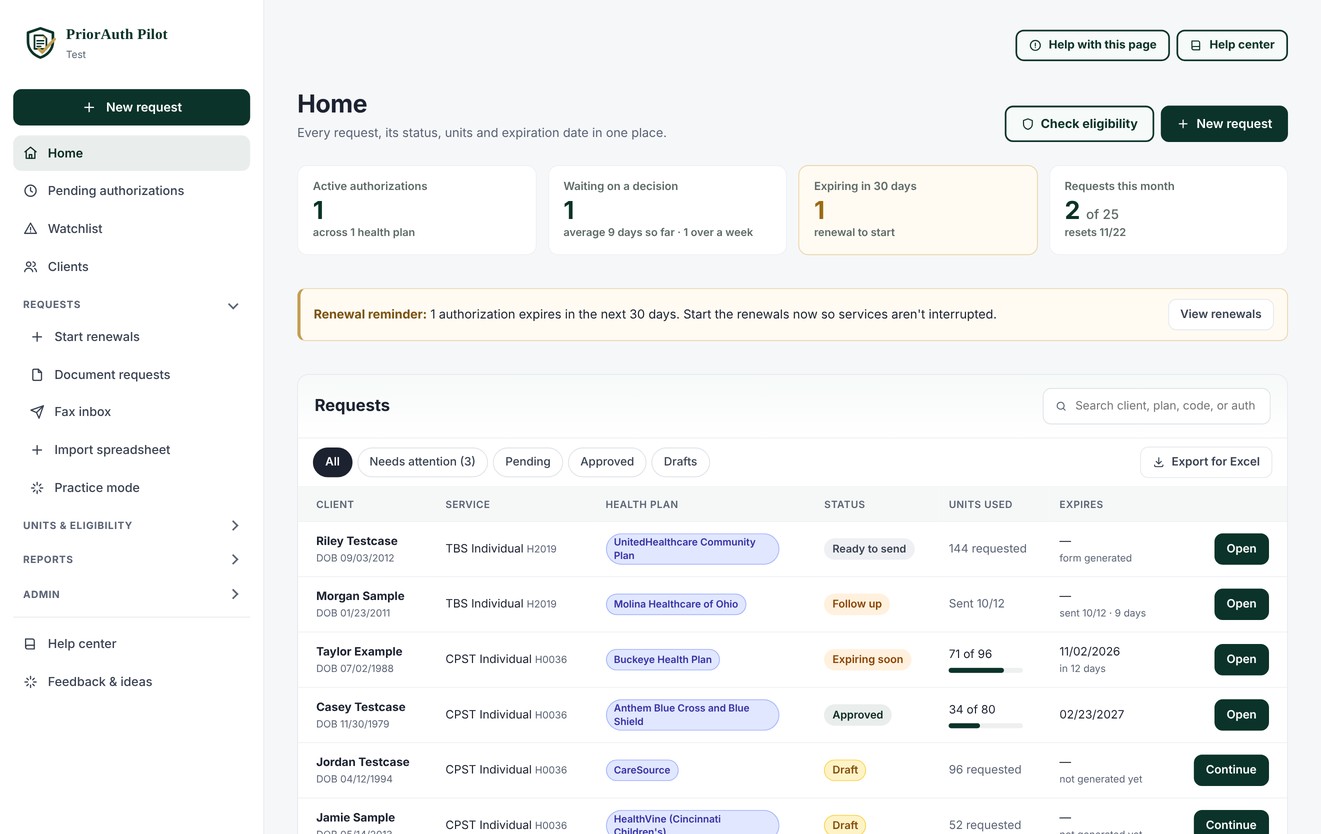
The PriorAuth Pilot Home page with made-up test clients: summary tiles, the request list with each request's status, what is coming up, and the menu with Pending authorizations
The Home page, with made-up test clients

See how it works

A 3-minute look at a request in the real app, from the client's documents to a finished ODM 10406 packet. It has narration and captions.

What it does

Document-first intake

Upload a client's documents and PriorAuth Pilot pre-fills the client profile: name, date of birth, Medicaid ID, plan and diagnosis.

Forms filled for you

Completes state request forms such as Ohio's ODM 10406 and builds a ready-to-submit PDF packet.

AI-assisted summaries

Drafts the medical necessity summary for staff to review, edit and approve before anything is sent.

Status and units tracking

Track every request from sent to approved, with units approved and expiration dates in one place.

Built for HIPAA

Encrypted in transit and at rest, role-based access, activity logs, and a Business Associate Agreement with every agency.

Eligibility checks

Check a client’s Ohio Medicaid coverage from inside the app. One check covers every Ohio Medicaid managed care plan and shows which one the client is in.

Fax to health plans

Optional fax add-on: send the finished packet to the plan from PriorAuth Pilot. With Fax Pro, plan letters faxed back are matched to the right request.

Reminders before authorizations expire

Reminders at 30, 14 and 7 days, alerts when units are running low, and renewals that start from the last request.

One-click appeals

When a plan denies a request, click Appeal. PriorAuth Pilot drafts the appeal letter from the denial and the client’s records for your staff to review. Fax it to the plan from the same page, or download it for the plan's portal. Appeal deadlines and outcomes are tracked.

Built by licensed behavioral health and accreditation professionals.

See it in action

Short videos and screens from PriorAuth Pilot. The clients are made-up test clients.

Catch problems before the plan does

The approval readiness check scores the packet in three parts, lists what's missing, and flags what a plan reviewer may question.

Every sentence checked against the records

Each sentence of the medical necessity summary is matched to the passage in the client's documents that supports it, so staff know what to double-check.

Deadlines that don't slip

The Watchlist puts what needs action at the top. Appeal deadlines within 7 days are marked urgent, and staff get email reminders without any client details.

Watchlist
What needs action now, across all your authorizations.
Appeal deadlines · Urgent: 1 due within 7 daysAppeals
Morgan Testcase
CareSource · appeal by 10/21/2026
1 day left

Appeal a denial in one click

PriorAuth Pilot drafts the appeal from the plan's denial and the client's records, on your letterhead. Review it, sign it, then fax it to the plan or download it for the portal.

Start free 3-day trial Request a live demo

What PriorAuth Pilot supports today

PriorAuth Pilot is built for Ohio behavioral health agencies that serve Medicaid clients.

State and form

Ohio. Requests are prepared on the Ohio Department of Medicaid prior authorization form (ODM 10406), with a ready-to-submit PDF packet.

Health plans

Ohio Medicaid managed care plans:

  • AmeriHealth Caritas Ohio
  • Anthem Blue Cross and Blue Shield
  • Buckeye Health Plan
  • CareSource
  • Humana Healthy Horizons in Ohio
  • Molina Healthcare of Ohio
  • UnitedHealthcare Community Plan of Ohio

Plus OhioRISE services.

Eligibility checks

Check a client's Ohio Medicaid eligibility from inside the app. One check shows which managed care plan the client is enrolled in. You can also double-check with the plan directly.

Services

Alcohol and Drug Assessment
Assertive Community Treatment
Psychological / Neuropsychological Testing
SBIRT Services
Psychiatric Diagnostic Evaluation
Peer Support
TBS Individual
TBS Group
CPST Individual
CPST Group
PSR
Group Psychotherapy
TBS Day Treatment (Hourly)
TBS Day Treatment (Per Diem)
Behavioral Health Respite (OhioRISE)
Intensive Home-Based Treatment (OhioRISE)

Other states: not available yet. If your agency is outside Ohio, tell us which state you need.

How submission and tracking work

Here is exactly what PriorAuth Pilot does, and what your staff do, at each step.

1. Prepare

Upload the client's treatment plan, assessment and other documents, each in its own box. PriorAuth Pilot fills in the client profile and the ODM 10406 form. On the Medical necessity step, the AI checks the Section IV criteria the records support and drafts the supporting information. Staff review, edit and approve everything (with a clinician's sign-off first, if your agency requires it), then create the PDF packet.

2. Submit

Fax the packet to the health plan from inside PriorAuth Pilot (with a fax add-on), or download it and upload it to the plan's provider portal yourself. Direct electronic submission to plans isn't connected yet.

3. Record the decision

Upload the plan's decision letter and PriorAuth Pilot reads the authorization number, dates and approved units for staff to confirm. With Fax Pro, decisions faxed back to your number are matched to the right request and read by the AI; staff check what it read and save it with one click.

4. Track units and renewals

Units used update when you upload your billing report (CSV or Excel) or connect your EHR. You get reminders before authorizations expire, and a renewal starts from the previous request.

5. Appeal a denial in one click

When a plan denies a request, click Appeal. PriorAuth Pilot drafts the appeal letter from the denial and the client's records, on your agency's letterhead. Staff review, edit and sign it, then fax it to the plan from the same page (with a fax add-on), or download it and send it through the plan's portal. PriorAuth Pilot tracks the appeal deadline, reminds you before it passes, and records whether the appeal was won or lost.

Works alongside your EHR

PriorAuth Pilot doesn't replace your EHR. It handles the authorization work your EHR leaves to spreadsheets, fax machines and sticky notes.

PriorAuth Pilot handles

  • Authorization packets and the ODM 10406 form
  • Faxing packets and recording decisions
  • Units, expiration dates and renewal reminders
  • Medicaid eligibility checks

Your EHR keeps

  • Clinical documentation and treatment plans
  • Scheduling
  • Billing and claims

Without an integration

Staff download the assessment and treatment plan from the EHR as PDFs and upload them to PriorAuth Pilot. To keep units current, upload your EHR's billing report as a CSV or Excel file. No IT project is needed to get started.

Connecting your EHR

PriorAuth Pilot has a secure API. There are no ready-made EHR integrations yet. A custom integration is available, subject to your EHR's capabilities: your EHR vendor or IT team builds the connection using our developer guide, and any setup costs from your vendor are separate. Here's what a connection can do:

Send data in automatically

Clients, documents like treatment plans and assessments, and billed units can flow in from your EHR, with no retyping.

Get updates back

Decisions, auth numbers, approved units and expiration dates can be sent back to your system automatically.

Secure by design

Each agency controls its own keys, every connection is logged, and data is encrypted, all under your Business Associate Agreement.

Ask us about connecting your EHR, or share our developer guide with your vendor.

See plans and pricing, or request a demo.